

Supported Features
How Numeral Works with Shopify and Fulfil
When you sell through Shopify, Shopify uses its own tax engine to calculate the correct tax rate at checkout. Fulfil’s Numeral integration handles the compliance side: when invoices are posted in Fulfil, Fulfil sends a new calculation to Numeral using the actual shipped line items and addresses, then records that as a transaction for tax filing. Both systems share the same Numeral account.- Shopify uses its own tax engine at checkout: When a customer places an order, Shopify calculates and applies tax at checkout using its own tax engine.
- Tax amounts sync to Fulfil: When orders import into Fulfil, the tax amounts from Shopify come with them.
- Fulfil sends a fresh calculation to Numeral: When an invoice is posted, Fulfil sends the actual invoice line items and shipping addresses to Numeral, which recalculates the tax and records it as a transaction for compliance.
Workflow Diagrams
Using Numeral with Shopify and Fulfil
This workflow shows how Shopify uses its own tax engine at checkout while Fulfil sends a new calculation and transaction to Numeral when the invoice is posted.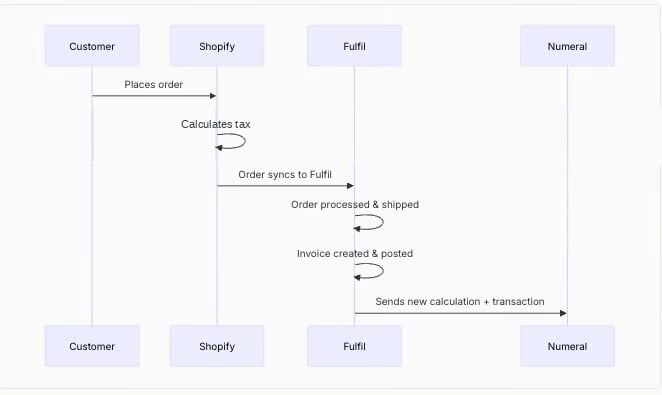
Using Numeral with Fulfil Only (Manual Orders)
This workflow applies when orders are created directly in Fulfil rather than imported from an e-commerce platform. This typically happens for wholesale orders, phone orders, or other sales where the merchant manually enters the order.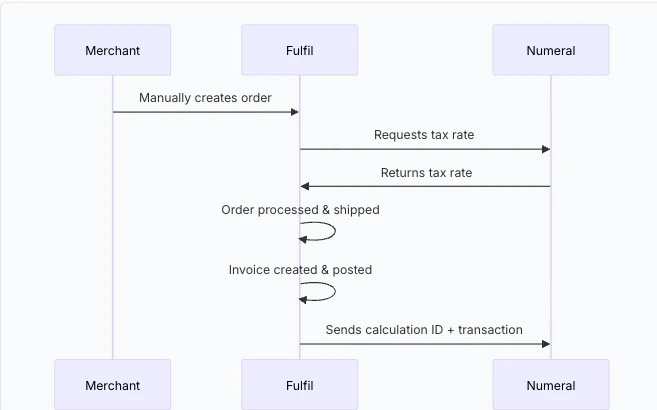
What Data is Sent to Numeral
Fulfil uses a two-step process when exporting an invoice to Numeral. First, it creates a tax calculation with your order details. Then, it creates a transaction that references that calculation.Calculation (Step 1)
Transaction (Step 2)
Addresses
Fulfil resolves addresses differently depending on whether the invoice is linked to a sales order. Invoices linked to a sales order:
Standalone invoices (not linked to a sales order):
Product Categories
Numeral uses product categories instead of numeric tax codes to determine taxability. Set the appropriate category for each product to ensure correct tax treatment. In Fulfil, the field is labelled Tax Code (Numeral) in the Tax integrations section on both product category and product forms. Categories can be set at the product category level or individual product level.FAQ
Does Numeral handle nexus automatically?
Does Numeral handle nexus automatically?
Numeral determines whether tax is owed automatically — you do not configure nexus in Numeral’s dashboard.In Fulfil, you add state entries only for states where you collect sales tax. Fulfil uses these to know which account to post the tax to. You do not need an entry for every US state — only add entries for states where Numeral returns a non-zero rate. If Numeral returns zero tax for a state, Fulfil skips it silently.If Numeral returns a non-zero rate for a state with no entry in the tax rule, the order will fail with No nexus has been setup for the state.
What's the difference between tax calculation and transaction reporting?
What's the difference between tax calculation and transaction reporting?
- Tax calculation happens when a manual order is created in Fulfil. Fulfil uses Numeral to determine the correct tax amount based on the ship-from warehouse and ship-to customer address.
- Transaction reporting sends completed invoice data to Numeral for tax filing. This happens when a customer invoice is posted in Fulfil, triggered by an automation rule.
What happens to credit notes?
What happens to credit notes?
When you post a credit note in Fulfil, the integration looks up the original invoice’s Numeral transaction ID and creates a refund in Numeral. The refund is linked to the original transaction so Numeral can adjust your tax liability accordingly.The credit note must be traceable back to the original invoice — either created directly from it, or generated from a return order that originated from the original sales order.Standalone credit notes and return orders created independently from the original order cannot be exported to Numeral. These will fail with:
Cannot export credit note to Numeral: unable to find the original invoice.Which invoices get exported to Numeral?
Which invoices get exported to Numeral?
Only posted customer invoices are exported. If you set an export start date during configuration, invoices before that date are skipped. Draft invoices are not exported.
Do service and shipping SKUs need a Numeral product category?
Do service and shipping SKUs need a Numeral product category?
Yes. A product category is required for every product Fulfil sends to Numeral, for both rate calculation on manual orders and transaction reporting when invoices are posted.Without a product category set, that line item is sent to Numeral without one, which can result in incorrect tax rates or incorrect compliance records.Use
SHIPPING for shipping and handling charge products, and EXEMPT for non-taxable services.