

calculation object contains tax rate information with support for per-unit line item pricing, IP-based tax resolution, origin addresses, metadata passthrough, and enhanced tax jurisdiction detail. A calculation also includes a calculation_id that you’ll use to record a transaction for filing.
When to create Calculations
Calculations should be used any time you need to calculate sales tax before charging a customer for a transaction. Most e-commerce clients will submit aPOST to /tax/calculations during their checkout flow after the end customer has submitted their address, but before collecting payment.
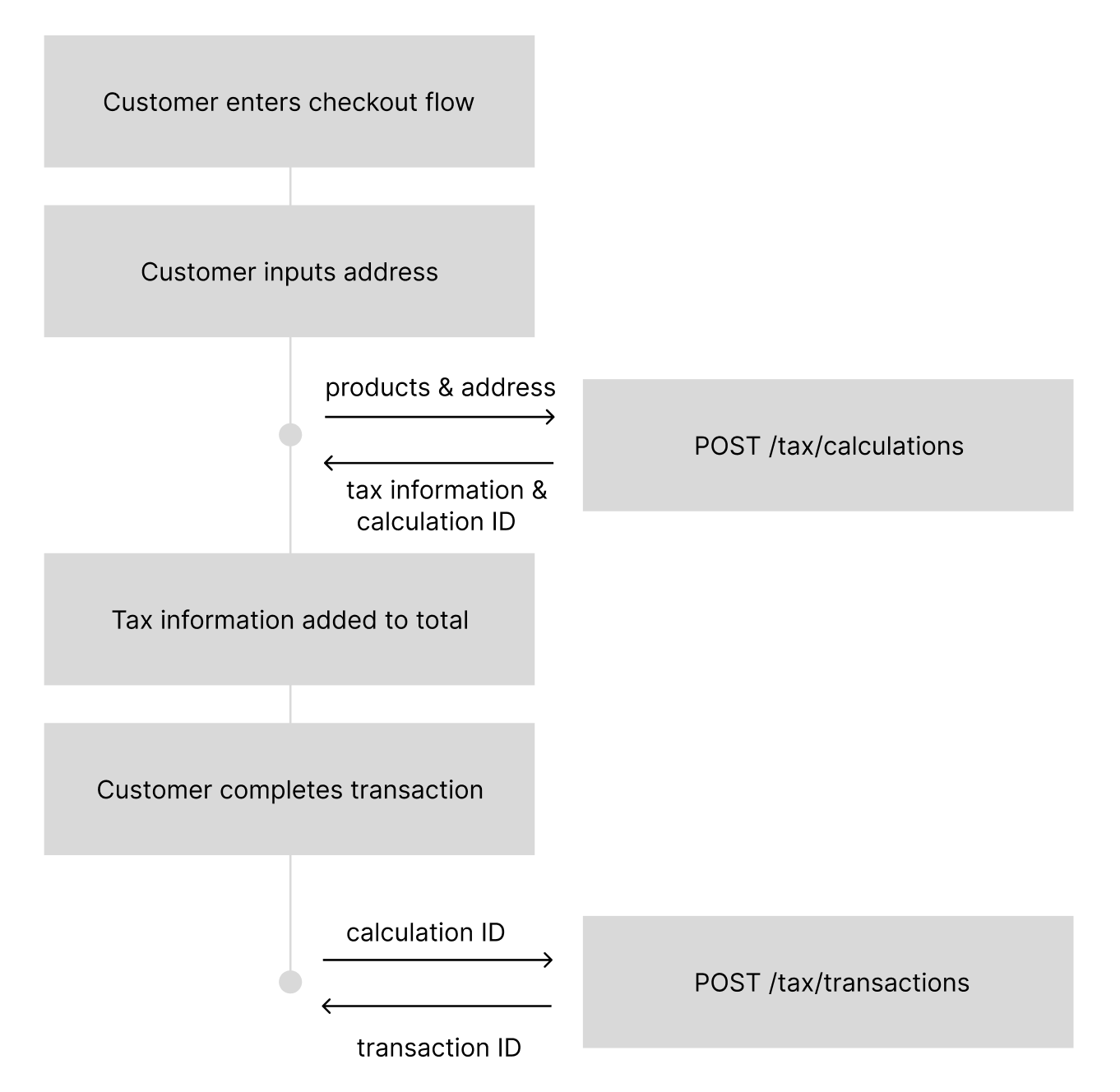
How to create Calculations
Calculation Request (2026-03-01)
Calculation Request (2026-03-01)
Sample Response
Sample Response
total_tax_amount to identify what to charge a user, but you will always have the details as you need them.
The second line item in the example response above is exactly this case: a $10,000 Nashville order whose four tax_rate values sum to 12.25% but whose tax_amount is $788.00.
For IP-based calculations, see the IP-Based Tax Resolution section below.
Request Parameters
Customer Object
address(object): Optional ifcustomer.ipis provided. At least one ofaddressoripmust be present.ip(object): New in 2026-03-01. See IP-Based Tax Resolution below.type(string): Customer type affecting tax calculation.CONSUMER(default) - Individual consumer, standard B2C tax calculationsBUSINESS- Business entity requiring tax IDs for B2B tax logic
tax_ids(array): Required for BUSINESS customers (except US), not allowed for CONSUMER customers.type(string): Stripe-style tax ID type. 439+ types supported includingus_ein,eu_vat,gb_vat,au_abn,ca_bn,jp_cn, and many more.value(string): Valid tax identification number
Origin Address
Order Details
amount(number): Per-unit price in the currency’s smallest unit (e.g., cents for USD). The taxable base isamount x quantity.automatic_tax(string): Controls tax collection and registration behavior.auto- Return tax rates everywhere you have an active registrationdisabled- Always return 0 tax regardless of thresholds
fallback_product_category(string): Optional. If you pass areference_product_idthat does not exist in Numeral, the calculation falls back to this product category instead of returning a 400. Useful for integration partners who want to always send a product ID without first ensuring the product has been created in Numeral. Must be a valid product category from the Numeral taxonomy. If thereference_product_idis found, its stored category takes precedence.
Metadata
Default Customer Type
customer.id that does not exist in Numeral, the calculation uses default_customer_type instead of returning a 400. The fallback type drives the same tax-exemption logic and business tax-ID validation as customer.type. If a matching customer is found, the stored customer.type takes precedence.
This is designed for integration partners who want to always include a customer ID in calculation requests without first ensuring the customer has been mirrored to Numeral.
- Accepted values:
CONSUMER,BUSINESS. - Available in API version
2026-03-01and later.
Passing
default_customer_type: "BUSINESS" on a non-US address still requires customer.tax_ids — VAT/GST rules are enforced as if the fallback were the resolved type.Transacted At
- Must be an integer Unix timestamp in seconds (not milliseconds).
- Available in API version
2026-03-01and later.
Features from 2026-01-01
Per-Unit Line Item Pricing
Theamount field on line items now represents the per-unit price rather than the total line item value. The taxable base is calculated as amount x quantity.
Enhanced Tax Jurisdiction Detail
Tax jurisdiction objects in the response now include richer detail from the tax engine:
The
jurisdiction_name and note fields from prior versions are no longer included in 2026-01-01+ responses.
Origin Address Support
You can now provide anorigin_address representing the ship-from location. This is used for origin-based tax jurisdictions where the seller’s location affects the applicable tax rate.
Address Resolution
Responses include information about how the address was resolved:address_resolution_status(string): Indicates the precision of the address match.
address_used(object): The resolved address that was actually used for the tax calculation.
Expanded Tax ID Types
Tax ID types have been expanded from 2 types (VAT, GST) to 439+ Stripe-style types. Examples include us_ein, eu_vat, gb_vat, au_abn, ca_bn, jp_cn, in_gst, br_cnpj, and many more.
Standard Error Format
Error responses use a flat format:{ "error": { "code": "...", "message": "..." } }) from versions prior to 2026-01-01.
IP-Based Tax Resolution (New in 2026-03-01)
Starting with API version2026-03-01, you can provide a customer IP address instead of a full street address. The API will geo-resolve the IP to determine the taxable location.
The customer.ip Object
customer.address or customer.ip must be provided. If both are given, the address is used first with IP as a fallback.
Resolution Modes
New Response Fields
Responses include additional fields when using this API version:IP-Based Calculation Request (IPv4)
IP-Based Calculation Request (IPv4)
IP-Based Calculation Response
IP-Based Calculation Response
IP Resolution Errors
When usingstrict mode, the API returns a 422 error if the IP cannot be resolved to sufficient detail for tax calculation.
IP Resolution Error Request (IPv6)
IP Resolution Error Request (IPv6)
IP Resolution Error Response (422)
IP Resolution Error Response (422)
To avoid resolution errors, use
resolution: "best_effort" or resolution: "zero" instead of strict. These modes will return a zero-rate response when resolution is insufficient rather than an error.