

calculation object contains tax rate information with support for per-unit line item pricing, origin addresses, metadata passthrough, and enhanced tax jurisdiction detail. A calculation also includes a calculation_id that you’ll use to record a transaction for filing.
When to create Calculations
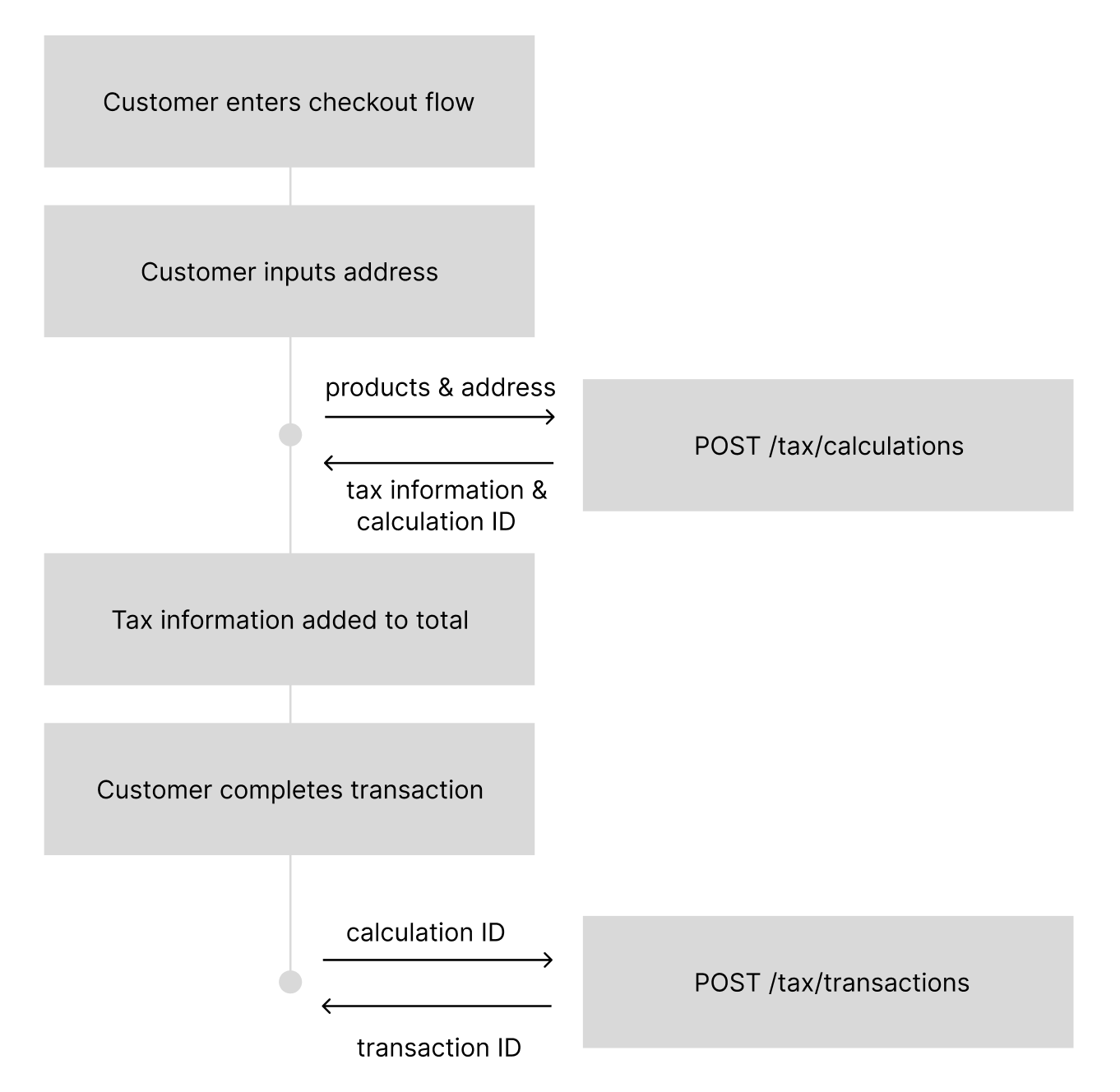
Calculations should be used any time you need to calculate sales tax before charging a customer for a transaction. Most e-commerce clients will submit aPOST to /tax/calculations during their checkout flow after the end customer has submitted their address, but before collecting payment.
How to create Calculations
Calculation Request (2026-01-01)
Calculation Request (2026-01-01)
Sample Response
Sample Response
total_tax_amount to identify what to charge a user, but you will always have the details as you need them.
The second line item in the example response above is exactly this case: a $10,000 Nashville order whose four tax_rate values sum to 12.25% but whose tax_amount is $788.00.
Request Parameters
Customer Object
address(object): Required. The customer’s address for tax calculation.type(string): Customer type affecting tax calculation.CONSUMER(default) - Individual consumer, standard B2C tax calculationsBUSINESS- Business entity requiring tax IDs for B2B tax logic
tax_ids(array): Required for BUSINESS customers (except US), not allowed for CONSUMER customers.type(string): Stripe-style tax ID type. 439+ types supported includingus_ein,eu_vat,gb_vat,au_abn,ca_bn,jp_cn, and many more.value(string): Valid tax identification number
Origin Address
Order Details
amount(number): Per-unit price in the currency’s smallest unit (e.g., cents for USD). The taxable base isamount x quantity.automatic_tax(string): Controls tax collection and registration behavior.auto- Return tax rates everywhere you have an active registrationdisabled- Always return 0 tax regardless of thresholds
fallback_product_category(string): Optional. If you pass areference_product_idthat does not exist in Numeral, the calculation falls back to this product category instead of returning a 400. Useful for integration partners who want to always send a product ID without first ensuring the product has been created in Numeral. Must be a valid product category from the Numeral taxonomy. If thereference_product_idis found, its stored category takes precedence.
Metadata
New Features in 2026-01-01
Per-Unit Line Item Pricing
Theamount field on line items now represents the per-unit price rather than the total line item value. The taxable base is calculated as amount x quantity.
Enhanced Tax Jurisdiction Detail
Tax jurisdiction objects in the response now include richer detail from the tax engine:
The
jurisdiction_name and note fields from prior versions are no longer included in 2026-01-01 responses.
Origin Address Support
You can now provide anorigin_address representing the ship-from location. This is used for origin-based tax jurisdictions where the seller’s location affects the applicable tax rate.
Address Resolution
Responses now include information about how the address was resolved:address_resolution_status(string): Indicates the precision of the address match.
address_used(object): The resolved address that was actually used for the tax calculation.
Expanded Tax ID Types
Tax ID types have been expanded from 2 types (VAT, GST) to 439+ Stripe-style types. Examples include us_ein, eu_vat, gb_vat, au_abn, ca_bn, jp_cn, in_gst, br_cnpj, and many more.
Standard Error Format
Error responses now use a flat format:{ "error": { "code": "...", "message": "..." } }).