

calculation object contains tax rate information with enhanced support for business-to-business (B2B) transactions. A calculation also includes a calculation_id that you’ll use to record a transaction for filing.
When to create Calculations
Calculations should be used any time you need to calculate sales tax before charging a customer for a transaction. Most e-commerce clients will submit aPOST to /tax/calculations during their checkout flow after the end customer has submitted their address, but before collecting payment.
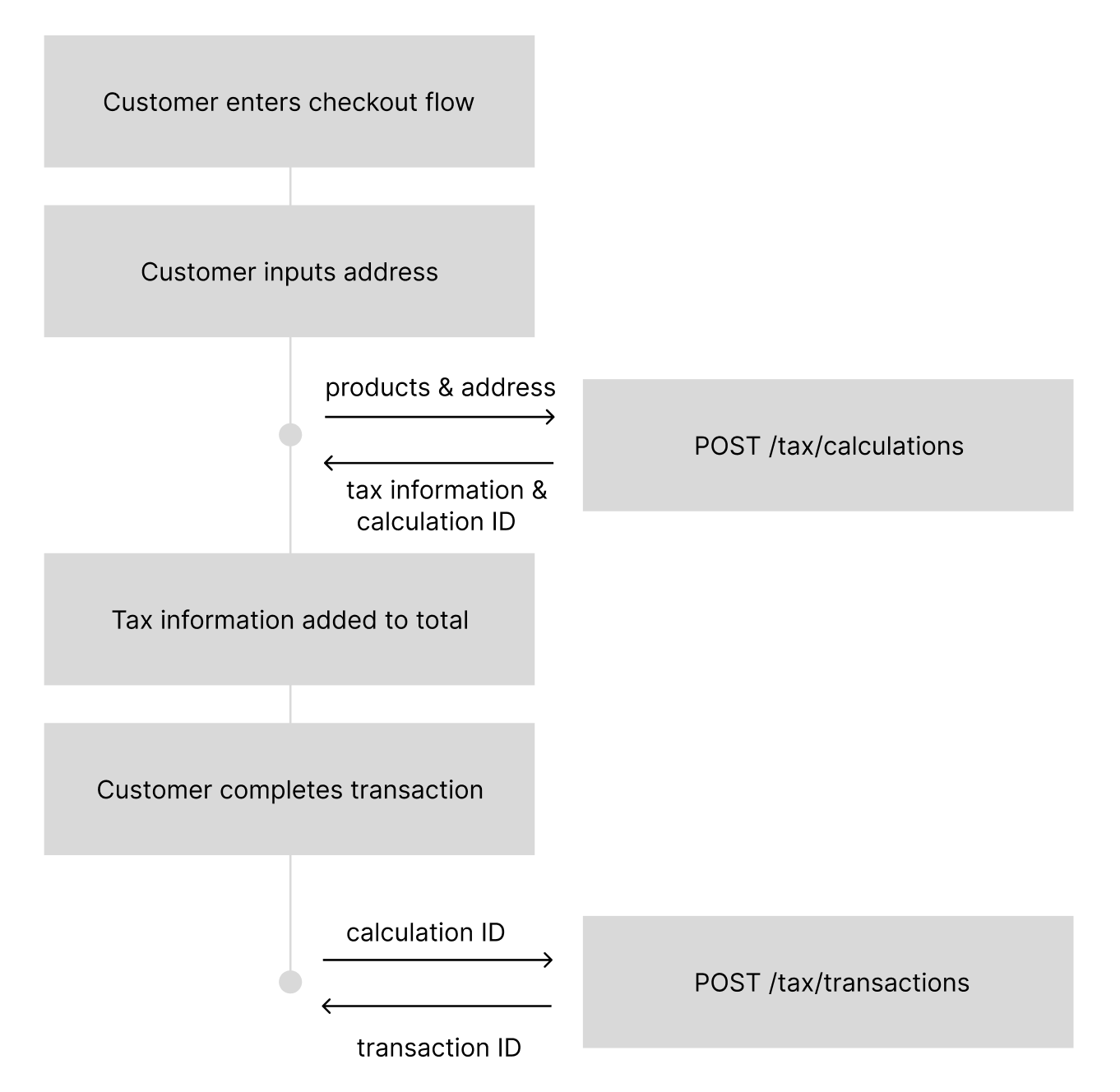
How to create Calculations
Enhanced Calculation Request
Enhanced Calculation Request
Sample Response
Sample Response
total_tax_amount to identify what to charge a user, but you will always have the details as you need them.
Request Parameters
Customer Object (Enhanced)
type(string): Customer type affecting tax calculationCONSUMER(default) - Individual consumer, standard B2C tax calculationsBUSINESS- Business entity requiring tax IDs for B2B tax logic
tax_ids(array): Required for BUSINESS customers (except US), not allowed for CONSUMER customerstype(string): Tax ID type (VATorGST)value(string): Valid tax identification number- Note: Not required for US-based BUSINESS customers in calculation requests
Order Details (Enhanced)
automatic_tax(string): Controls tax collection and registration behaviorauto- Return tax rates everywhere you have an active registrationdisabled- Always return 0 tax regardless of thresholds
fallback_product_category(string, on each line item): Optional. If you pass areference_product_idthat does not exist in Numeral, the calculation falls back to this product category instead of returning a 400. Must be a valid product category from the Numeral taxonomy. If thereference_product_idis found, its stored category takes precedence.
Enhanced Features in 2025-05-12
Customer Types and B2B Logic
The 2025-05-12 version introduces business-to-business (B2B) tax logic through customer types:- BUSINESS customers: Must provide valid tax IDs (except for US-based calculations), enabling B2B tax exemptions and reverse charge mechanisms in applicable jurisdictions
- CONSUMER customers: Standard B2C tax calculations without tax ID requirements. This is the default if the
typefield is omitted.
Tax ID Validation
When usingcustomer.type: "BUSINESS", tax IDs are validated in real-time:
- VAT IDs: Validated against European VIES database
- GST IDs: Validated for applicable countries
- Invalid tax IDs will result in calculation errors
Automatic Tax Configuration
Theautomatic_tax setting provides granular control over tax collection: