> ## Documentation Index
> Fetch the complete documentation index at: https://docs.numeral.com/llms.txt
> Use this file to discover all available pages before exploring further.
# Transactions
> Use the `transactions` object to record a sale for filing
The `transaction` object is used to represent an actual sale or completed purchase in your system. Numeral will file and remit taxes for you based on all `transactions` that are recorded in a relevant jurisdiction and time period.
## When to create Transactions
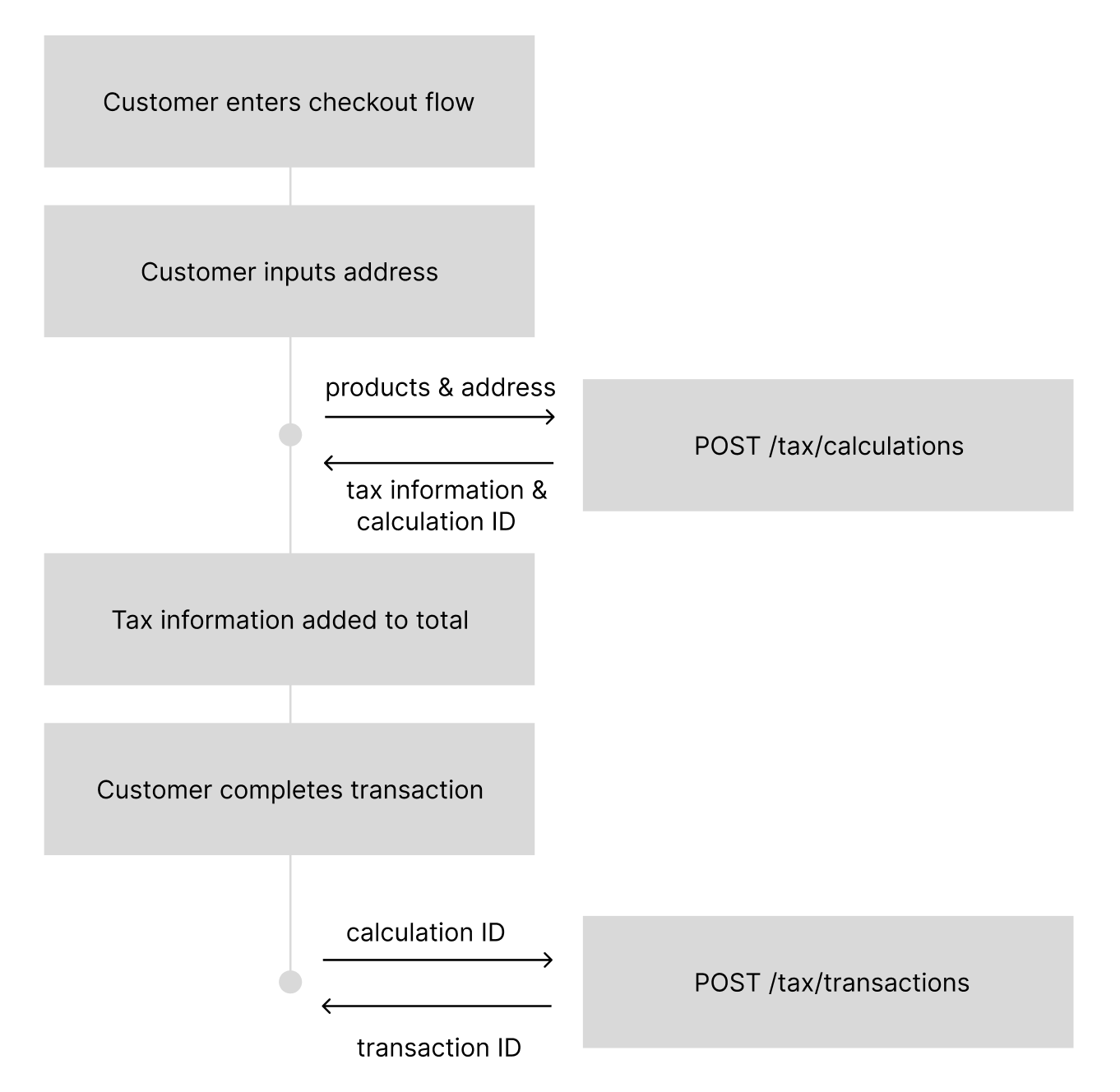
After you make a sale, you'll want to create a `transaction`. First, though, you'll have to have made a `calculation` - you need a `calculation_id` to record a transaction. This ensures we keep all the tax and accounting information tidy for filings.
A transaction will include most of the information that was contained in the associated calculation, in addition to a new `transaction_id`.
 ## How to create Transactions
Because the transaction is associated with a `calculation` you've already created, the payload can be fairly simple.
Here's an example:
```
curl --request POST \
--url https://api.numeralhq.com/tax/transactions \
--header 'Authorization: Bearer ' \
--header 'Content-Type: application/json' \
--data '{
"calculation_id": "calc_173640547356819813104-07b9-48b9-8370-0cbb1e0c36c7",
"reference_order_id": "343-45836"
}'
```
When it comes time to file with the state, we'll ensure that order is included and accounted for.
The response from a transaction includes some information from the calculation, including the line items.
```json theme={null}
{
"testmode": true,
"id": "tr_17364055483633b874c93-b888-4b78-a4b8-bf0e7b99e477",
"object": "tax.transaction",
"calculation_id": "calc_173640547356819813104-07b9-48b9-8370-0cbb1e0c36c7",
"filing_currency_code": "USD",
"customer_currency_code": "USD",
"line_items": [
{
"product": {
"reference_line_item_id": "898347",
"reference_product_id": "p-000000001",
"reference_product_name": "BEVERAGES",
"product_tax_code": "BEVERAGES"
},
"tax_jurisdictions": [
{
"tax_rate": 0.07,
"rate_type": "STATE SALES TAX",
"jurisdiction_name": "INDIANA",
"fee_amount": 0,
"note": ""
}
],
"tax_amount": 14,
"amount_excluding_tax": 200,
"amount_including_tax": 214,
"quantity": 2
}
],
"reference_order_id": "343-45836",
"transaction_processed_at": 1736405548
}
```
## Further documentation
The full documentation for creating transactions is on [this page](/api-reference/endpoint/transactions).
## How to create Transactions
Because the transaction is associated with a `calculation` you've already created, the payload can be fairly simple.
Here's an example:
```
curl --request POST \
--url https://api.numeralhq.com/tax/transactions \
--header 'Authorization: Bearer ' \
--header 'Content-Type: application/json' \
--data '{
"calculation_id": "calc_173640547356819813104-07b9-48b9-8370-0cbb1e0c36c7",
"reference_order_id": "343-45836"
}'
```
When it comes time to file with the state, we'll ensure that order is included and accounted for.
The response from a transaction includes some information from the calculation, including the line items.
```json theme={null}
{
"testmode": true,
"id": "tr_17364055483633b874c93-b888-4b78-a4b8-bf0e7b99e477",
"object": "tax.transaction",
"calculation_id": "calc_173640547356819813104-07b9-48b9-8370-0cbb1e0c36c7",
"filing_currency_code": "USD",
"customer_currency_code": "USD",
"line_items": [
{
"product": {
"reference_line_item_id": "898347",
"reference_product_id": "p-000000001",
"reference_product_name": "BEVERAGES",
"product_tax_code": "BEVERAGES"
},
"tax_jurisdictions": [
{
"tax_rate": 0.07,
"rate_type": "STATE SALES TAX",
"jurisdiction_name": "INDIANA",
"fee_amount": 0,
"note": ""
}
],
"tax_amount": 14,
"amount_excluding_tax": 200,
"amount_including_tax": 214,
"quantity": 2
}
],
"reference_order_id": "343-45836",
"transaction_processed_at": 1736405548
}
```
## Further documentation
The full documentation for creating transactions is on [this page](/api-reference/endpoint/transactions).