> ## Documentation Index
> Fetch the complete documentation index at: https://docs.numeral.com/llms.txt
> Use this file to discover all available pages before exploring further.
# Calculations
> Use the `calculation` object to get tax rates with enhanced B2B support
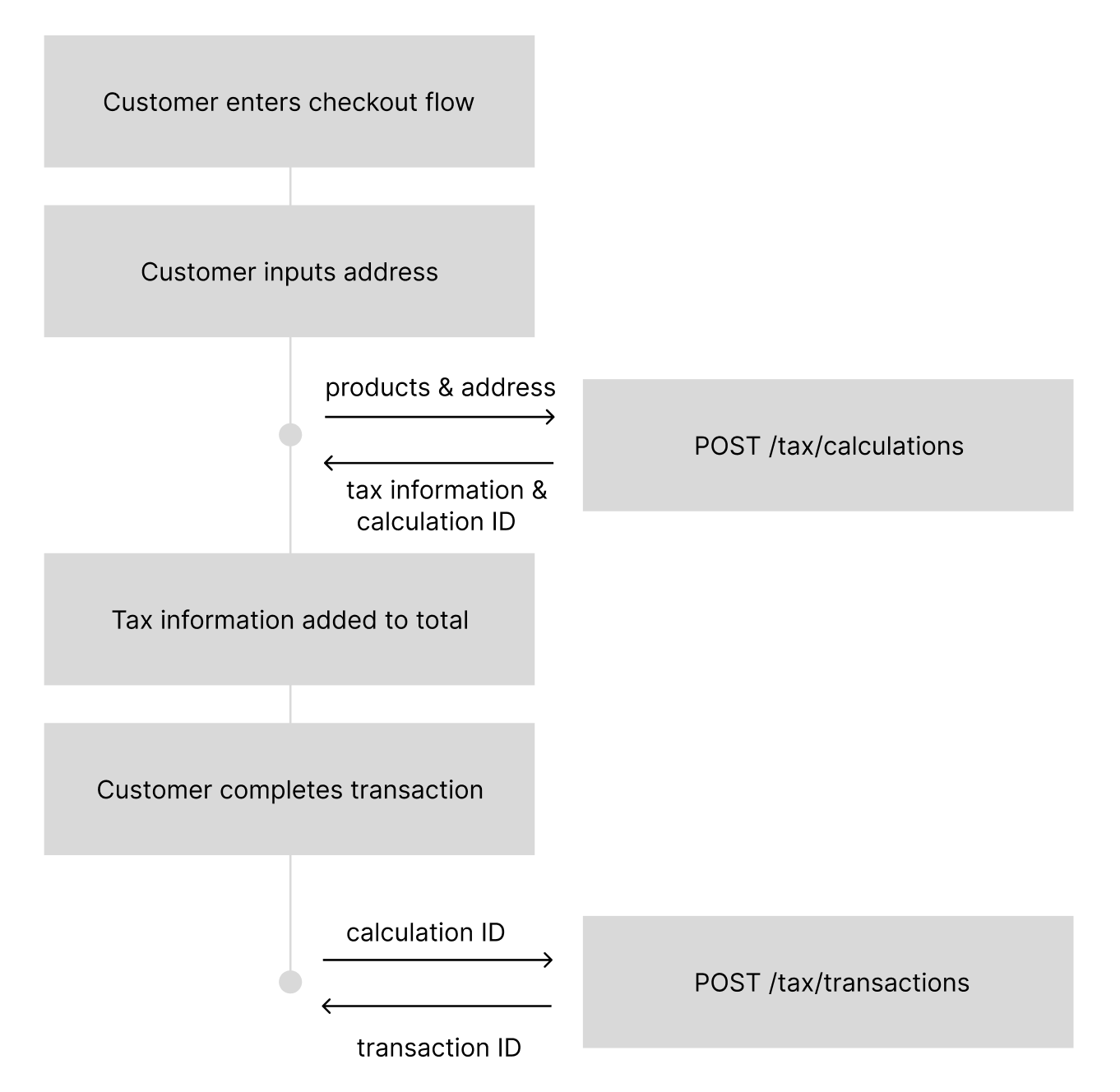
The `calculation` object contains tax rate information with enhanced support for business-to-business (B2B) transactions. A calculation also includes a `calculation_id` that you'll use to record a `transaction` for filing.
## When to create Calculations
Calculations should be used any time you need to calculate sales tax before charging a customer for a transaction. Most e-commerce clients will submit a `POST` to `/tax/calculations` during their checkout flow after the end customer has submitted their address, but before collecting payment.
 ## How to create Calculations
```
curl --request POST \
--url https://api.numeralhq.com/tax/calculations \
--header 'Authorization: Bearer ' \
--header 'Content-Type: application/json' \
--header 'X-API-Version: 2025-05-12' \
--data '{
"customer": {
"address": {
"address_line_1": "10 Downing Street",
"address_city": "London",
"address_province": "Greater London",
"address_postal_code": "SW1A 2AA",
"address_country": "GB",
"address_type": "shipping"
},
"type": "BUSINESS",
"tax_ids": [
{
"type": "VAT",
"value": "GB123456789"
}
]
},
"order_details": {
"customer_currency_code": "GBP",
"tax_included_in_amount": false,
"automatic_tax": "auto",
"line_items": [
{
"reference_line_item_id": "line_123456789",
"product_category": "SAAS_GENERAL",
"amount": 200,
"quantity": 2
}
]
}
}'
```
```json theme={null}
{
"testmode": false,
"id": "calc_1748380341807e125e1a0-415e-407d-98e4-00d2717f4ac9",
"object": "tax.calculation",
"customer_currency_code": "GBP",
"line_items": [
{
"line_item_id": "li_1748380341807098a8e8c-654c-4b32-9dbd-7bf883482ca2",
"product": {
"reference_line_item_id": "line_123456789",
"reference_product_id": "1",
"reference_product_name": "Sales",
"product_tax_code": "SAAS_GENERAL"
},
"tax_jurisdictions": [
{
"tax_rate": 0.20,
"rate_type": "VAT",
"jurisdiction_name": "United Kingdom",
"fee_amount": 0,
"note": "collection_threshold_reached"
}
],
"tax_amount": 40,
"amount_excluding_tax": 200,
"amount_including_tax": 240,
"quantity": 2
}
],
"total_tax_amount": 40,
"tax_included_in_amount": false,
"total_amount_excluding_tax": 200,
"total_amount_including_tax": 240,
"expires_at": 1748466741,
"customer": {
"type": "BUSINESS"
},
"automatic_tax": "auto"
}
```
We return both the aggregate tax information as well as a detailed breakdown for each line item. Many users will just use the `total_tax_amount` to identify what to charge a user, but you will always have the details as you need them.
## Request Parameters
### Customer Object (Enhanced)
```json theme={null}
{
"customer": {
"id": "cus_123456789", // Optional customer ID
"address": {
"address_line_1": "10 Downing Street",
"address_line_2": "", // Optional
"address_city": "London",
"address_province": "Greater London",
"address_postal_code": "SW1A 2AA",
"address_country": "GB",
"address_type": "shipping" // "shipping" or "billing"
},
"type": "BUSINESS", // "BUSINESS" or "CONSUMER" (default if omitted)
"tax_ids": [ // Required for BUSINESS (except US), not allowed for CONSUMER
{
"type": "VAT", // "VAT" or "GST"
"value": "GB123456789"
}
]
}
}
```
**New Fields in 2025-05-12:**
* **`type`** (string): Customer type affecting tax calculation
* `CONSUMER` (default) - Individual consumer, standard B2C tax calculations
* `BUSINESS` - Business entity requiring tax IDs for B2B tax logic
* **`tax_ids`** (array): Required for BUSINESS customers (except US), not allowed for CONSUMER customers
* **`type`** (string): Tax ID type (`VAT` or `GST`)
* **`value`** (string): Valid tax identification number
* **Note**: Not required for US-based BUSINESS customers in calculation requests
### Order Details (Enhanced)
```json theme={null}
{
"order_details": {
"customer_currency_code": "GBP", // Supports 32 currencies
"tax_included_in_amount": false,
"automatic_tax": "auto", // New field for tax control
"line_items": [
{
"reference_line_item_id": "line_123456789", // Optional
"reference_product_id": "p-1233543", // Required if no product_category
"product_category": "SAAS_GENERAL", // Required if no reference_product_id
"fallback_product_category": "SAAS_GENERAL", // Optional - used if reference_product_id is not found
"amount": 200, // In currency's smallest unit (e.g., cents for USD, whole units for JPY)
"quantity": 2
}
]
}
}
```
**New Fields in 2025-05-12:**
* **`automatic_tax`** (string): Controls tax collection and registration behavior
* `auto` - Return tax rates everywhere you have an active registration
* `disabled` - Always return 0 tax regardless of thresholds
* **`fallback_product_category`** (string, on each line item): Optional. If you pass a `reference_product_id` that does not exist in Numeral, the calculation falls back to this product category instead of returning a 400. Must be a valid product category from the Numeral taxonomy. If the `reference_product_id` is found, its stored category takes precedence.
## Enhanced Features in 2025-05-12
### Customer Types and B2B Logic
The 2025-05-12 version introduces business-to-business (B2B) tax logic through customer types:
* **BUSINESS customers**: Must provide valid tax IDs (except for US-based calculations), enabling B2B tax exemptions and reverse charge mechanisms in applicable jurisdictions
* **CONSUMER customers**: Standard B2C tax calculations without tax ID requirements. This is the default if the `type` field is omitted.
### Tax ID Validation
When using `customer.type: "BUSINESS"`, tax IDs are validated in real-time:
* **VAT IDs**: Validated against European VIES database
* **GST IDs**: Validated for applicable countries
* Invalid tax IDs will result in calculation errors
### Automatic Tax Configuration
The `automatic_tax` setting provides granular control over tax collection:
| Setting | Tax Rates Returned | Registration Triggered | Use Case |
| ---------- | ------------------------------------ | ---------------------- | -------------------- |
| `auto` | ✅ Where you have active registration | ❌ No | Standard operation |
| `disabled` | ❌ Always 0 | ❌ No | Tax-exempt scenarios |
### Enhanced Currency Support
The 2025-05-12 version supports 32 currencies (22 additional beyond the original 10), enabling global tax calculations across major markets including GBP, AUD, JPY, SGD, and many others.
## Further documentation
The full documentation for creating calculations is on [this page](/api-reference/v2025-05-12/endpoint/calculations).
## How to create Calculations
```
curl --request POST \
--url https://api.numeralhq.com/tax/calculations \
--header 'Authorization: Bearer ' \
--header 'Content-Type: application/json' \
--header 'X-API-Version: 2025-05-12' \
--data '{
"customer": {
"address": {
"address_line_1": "10 Downing Street",
"address_city": "London",
"address_province": "Greater London",
"address_postal_code": "SW1A 2AA",
"address_country": "GB",
"address_type": "shipping"
},
"type": "BUSINESS",
"tax_ids": [
{
"type": "VAT",
"value": "GB123456789"
}
]
},
"order_details": {
"customer_currency_code": "GBP",
"tax_included_in_amount": false,
"automatic_tax": "auto",
"line_items": [
{
"reference_line_item_id": "line_123456789",
"product_category": "SAAS_GENERAL",
"amount": 200,
"quantity": 2
}
]
}
}'
```
```json theme={null}
{
"testmode": false,
"id": "calc_1748380341807e125e1a0-415e-407d-98e4-00d2717f4ac9",
"object": "tax.calculation",
"customer_currency_code": "GBP",
"line_items": [
{
"line_item_id": "li_1748380341807098a8e8c-654c-4b32-9dbd-7bf883482ca2",
"product": {
"reference_line_item_id": "line_123456789",
"reference_product_id": "1",
"reference_product_name": "Sales",
"product_tax_code": "SAAS_GENERAL"
},
"tax_jurisdictions": [
{
"tax_rate": 0.20,
"rate_type": "VAT",
"jurisdiction_name": "United Kingdom",
"fee_amount": 0,
"note": "collection_threshold_reached"
}
],
"tax_amount": 40,
"amount_excluding_tax": 200,
"amount_including_tax": 240,
"quantity": 2
}
],
"total_tax_amount": 40,
"tax_included_in_amount": false,
"total_amount_excluding_tax": 200,
"total_amount_including_tax": 240,
"expires_at": 1748466741,
"customer": {
"type": "BUSINESS"
},
"automatic_tax": "auto"
}
```
We return both the aggregate tax information as well as a detailed breakdown for each line item. Many users will just use the `total_tax_amount` to identify what to charge a user, but you will always have the details as you need them.
## Request Parameters
### Customer Object (Enhanced)
```json theme={null}
{
"customer": {
"id": "cus_123456789", // Optional customer ID
"address": {
"address_line_1": "10 Downing Street",
"address_line_2": "", // Optional
"address_city": "London",
"address_province": "Greater London",
"address_postal_code": "SW1A 2AA",
"address_country": "GB",
"address_type": "shipping" // "shipping" or "billing"
},
"type": "BUSINESS", // "BUSINESS" or "CONSUMER" (default if omitted)
"tax_ids": [ // Required for BUSINESS (except US), not allowed for CONSUMER
{
"type": "VAT", // "VAT" or "GST"
"value": "GB123456789"
}
]
}
}
```
**New Fields in 2025-05-12:**
* **`type`** (string): Customer type affecting tax calculation
* `CONSUMER` (default) - Individual consumer, standard B2C tax calculations
* `BUSINESS` - Business entity requiring tax IDs for B2B tax logic
* **`tax_ids`** (array): Required for BUSINESS customers (except US), not allowed for CONSUMER customers
* **`type`** (string): Tax ID type (`VAT` or `GST`)
* **`value`** (string): Valid tax identification number
* **Note**: Not required for US-based BUSINESS customers in calculation requests
### Order Details (Enhanced)
```json theme={null}
{
"order_details": {
"customer_currency_code": "GBP", // Supports 32 currencies
"tax_included_in_amount": false,
"automatic_tax": "auto", // New field for tax control
"line_items": [
{
"reference_line_item_id": "line_123456789", // Optional
"reference_product_id": "p-1233543", // Required if no product_category
"product_category": "SAAS_GENERAL", // Required if no reference_product_id
"fallback_product_category": "SAAS_GENERAL", // Optional - used if reference_product_id is not found
"amount": 200, // In currency's smallest unit (e.g., cents for USD, whole units for JPY)
"quantity": 2
}
]
}
}
```
**New Fields in 2025-05-12:**
* **`automatic_tax`** (string): Controls tax collection and registration behavior
* `auto` - Return tax rates everywhere you have an active registration
* `disabled` - Always return 0 tax regardless of thresholds
* **`fallback_product_category`** (string, on each line item): Optional. If you pass a `reference_product_id` that does not exist in Numeral, the calculation falls back to this product category instead of returning a 400. Must be a valid product category from the Numeral taxonomy. If the `reference_product_id` is found, its stored category takes precedence.
## Enhanced Features in 2025-05-12
### Customer Types and B2B Logic
The 2025-05-12 version introduces business-to-business (B2B) tax logic through customer types:
* **BUSINESS customers**: Must provide valid tax IDs (except for US-based calculations), enabling B2B tax exemptions and reverse charge mechanisms in applicable jurisdictions
* **CONSUMER customers**: Standard B2C tax calculations without tax ID requirements. This is the default if the `type` field is omitted.
### Tax ID Validation
When using `customer.type: "BUSINESS"`, tax IDs are validated in real-time:
* **VAT IDs**: Validated against European VIES database
* **GST IDs**: Validated for applicable countries
* Invalid tax IDs will result in calculation errors
### Automatic Tax Configuration
The `automatic_tax` setting provides granular control over tax collection:
| Setting | Tax Rates Returned | Registration Triggered | Use Case |
| ---------- | ------------------------------------ | ---------------------- | -------------------- |
| `auto` | ✅ Where you have active registration | ❌ No | Standard operation |
| `disabled` | ❌ Always 0 | ❌ No | Tax-exempt scenarios |
### Enhanced Currency Support
The 2025-05-12 version supports 32 currencies (22 additional beyond the original 10), enabling global tax calculations across major markets including GBP, AUD, JPY, SGD, and many others.
## Further documentation
The full documentation for creating calculations is on [this page](/api-reference/v2025-05-12/endpoint/calculations).